
Rules & Practical Info
How does 'Quizzio Online' work?
Quizzio Online is a live, online quiz, moderated by a quiz master, and streamed via the ZOOM platform. The quiz lasts approx. 90 minutes and is played in teams. The questions will be visible in the virtual meeting room and will also be pronounced by the quiz master. The quiz consists of 3 rounds and each round counts 10 to 15 questions and an extra mission.
At the start of each round, all team captains can access the answer form for that specific round. It is an online form which is opened in a web browser. The other team members will not be able to access this form. After each round, the team captain submits the answers, after which the jury corrects them.
At the start of each round, all team members also get access to an extra mission which will not be treated by the quiz master and which will be available only through this website. The answers to this extra mission must be submitted by the team captain at the end of each round, along with the answers to the questions of this round.
We are all working from home. How can we work together as a team?
The team captain should not solve the quiz questions on his own while the other team members only deal with the extra mission. Only by working together and using the expertise of all team members, a team will maximize its winning chances.
That’s why you should set up a collaborative chat environment for your team. Usually the teams set up a WhatsApp group chat or a Skype chat, in order to stay in touch with each other during the quiz. This could even be a video & audio session (MS Teams, Jitsi, …) – but in that case you better use another device (smartphone, tablet) so that there is no interference with the ZOOM session on your main device.
Make specific appointments within your team concerning this collaborative environment, ideally some days before the quiz.
How can we access the virtual quiz environment?
The link to the virtual quiz environment can be found here. You’ll first get access to a waiting room, from where the quiz master will give you access to the virtual quiz room some minutes before the quiz starts. Please respect this start hour.
What are the technical requirements for team members?
The most important requirement is that your device (PC, laptop, tablet, smartphone) has speakers so that you can hear the quiz master. As a participant you are not obliged to have a camera and microphone, although that makes the experience way more interactive and involving.
Although the quiz can be followed on a smartphone, our advice is to use at least a tablet – and preferably a laptop or PC. Some questions will have photos, of which it will be hard to see the details on the screen of a smartphone.
The ZOOM software will be installed automatically as soon as you follow the link to the virtual quiz environment. This barely takes one minute. The software can also be pre-installed via this link (Zoom Client for Meetings). Before the quiz you can also read the explanations on this page. There is even a possibility to set up a ZOOM test session.
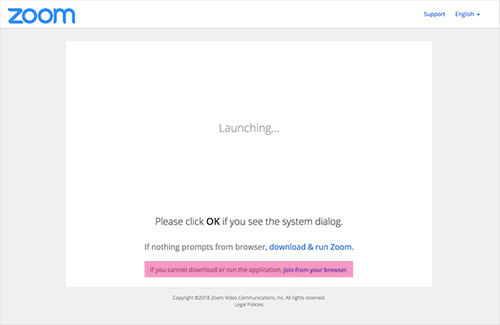
If the company policy doesn’t allow you to install the ZOOM application, follow the link ‘Join from your browser’ on the ZOOM session access page. Preferably use Chrome as a browser and surely not Safari (sound problems).
On top of this, each team member needs to have access to this web page.
Preferably you should also have some paper and a pen within reach during the quiz.
The team members will continously need to toggle between the ZOOM meeting, the collaborative chat environment and the extra mission.
What are the technical requirements for team captains?
For the team captains the same requirements apply as for the team members. The team captains will continously need to toggle between the ZOOM meeting, the collaborative chat environment and the answer form.
What if I have technical problems?
If you experience technical problems which are inherent to your specific situation (e.g. a failing internet connection, problems with the speakers, …), we unfortunately cannot help you. This would slow down the quiz too much. That’s why we ask you to test your set-up before the start of the quiz.
However, if a specific quiz question is not clear, team captains can contact Whatsapp Live Support. They will receive information about Whatsapp Live Support some days before the quiz.
Whatsapp Live Support is only available to the team captains and cannot be reached by phone (only Whatsapp messaging). The helpline will be continuously available during the quiz, but can only be contacted by the team captains. Requests to Whatsapp Live Support by other participants will not be answered.
Although a chat function is available within ZOOM, we explicitly ask not to contact the quiz master through this channel – these chats will be ignored.
If complaints through Whatsapp Live Support influence the jury’s decisions, these will be clearly communicated on the results page afterwards.
Can a team be disqualified?
This should be a fun experience, so nobody wants to be threatened with disqualification. The only strict quiz rule is that at the end of each round (and upon the sign from the quiz master) the answer form should be submitted immediately by the team captain. The reason is very simple: only when all answer forms have been submitted, we can start going through the correct answers of the round. Because we want to keep the pace fast enough, we should avoid that other teams need to wait for one or two slow team captains.
How fast will the final results become available?
The official results will be displayed on this page no more than 5 minutes after the end of the quiz. A Top-5 ranking will be given by the quizmaster at the end of the quiz. Also intermediate results will be communicated now and then during the quiz.
What if two or more teams have the same number of points?
If at the end of the quiz two or more teams have the same number of points, the winner will be the team which was the quickest to submit the answer form of the final round.
What if I still have some questions after having read this practical information?
You can send a mail to info@quizbizz.be and we will answer you as quickly as possible.